Overview
The General page of the Administration Area is where the main configuration of your wiki site resides.
Site Info
| Field | Description |
|---|---|
| Site Title | The name of your wiki, displayed in the site header and as site meta title. |
| Site Description | A short description of your wiki, used as the site meta description. |
| Site Hostname | The hostname (e.g. wiki.company.com) the site should respond to. Set to * for a catch-all / fallback domain. Note that you can only have 1 wildcard hostname wiki. |
Footer / Copyright
| Field | Description |
|---|---|
| Company / Organization Name | Name to use when displaying copyright notice in the footer. Leave empty to hide. |
| Content License | License shown in the footer of all content pages. |
| Additional Footer Text | Optionally add more content to the footer, such as additional copyright terms or mandatory regulatory info. |
Features
| Feature | Description |
|---|---|
| Allow Browsing | Can users browse using the tree structure of the site to pages they have access to? The Browse button will be hidden when off. This does not affect the File Manager. |
| Allow Collaborative Editing | Can several people edit the same page at the same time, seeing each other's cursors and changes live? Applies to the markdown editor. Changes are still only stored when someone saves the page. |
| Allow Comments | Can users leave comments on pages? Can be restricted using Page Rules. |
| Allow Profile Editing | Can users edit their own profile? If profile data is managed by an external identity provider, you should turn this off. |
| Allow Ratings | Can users leave ratings on pages? Can be restricted using Page Rules. |
| Allow Search | Can users search for content they have read access to? The search input field will be hidden when off. |
| Reason for Change | Should users be prompted the reason for changes made to a page? This is shown in the Page History timeline and in some storage targets (e.g. commit message in git). |
Logo
Upload your site logo to be displayed in the top-left corner of your wiki.
Image Specs
- SVG, PNG, JPG, WebP or GIF format.
- The uploaded image will automatically be resized and optimized (unless it's a SVG).
Aspect Ratio
By default, the logo will be constrained to a square aspect ratio. If you have a wide logo or wordmark that doesn't look right as a square, you can turn off the "Display Site Title" option; which will unlock the aspect ratio and hide the Site Title.
Favicon
Upload an image to be used as the favicon (shown in the browser tab). Unlike the site logo, favicons MUST be square and will be cropped.
Site-wide Banner
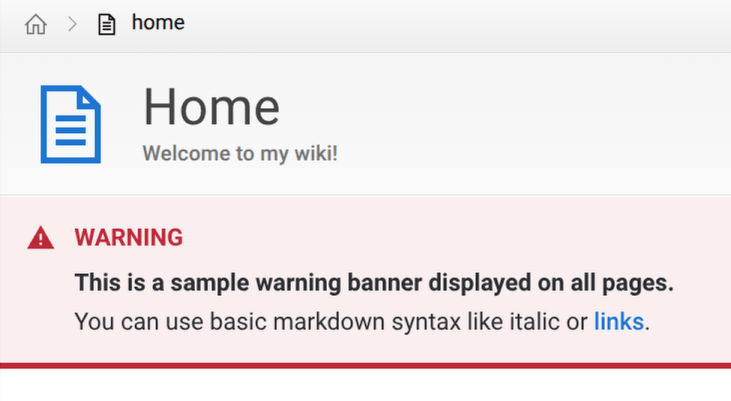
You can display a banner to be displayed on all pages in your wiki by turning on the Show Banner option. This is useful for advertising maintenance notices or other warnings to all users.
Optionally provide a Banner Title.
The Banner Contents accepts basic markdown syntax for formatting.
Example:
Discovery
Warning
This feature is not yet implemented.
Turning discovery on allows your wiki to be discovered by other users and wikis, via the Wiki Directory project.